
Portfolio Resourcing (Internal)
This functionality is specifically for SRI
To view and download the Portfolio Resourcing (Internal) report, follow the below steps:
1. Click on Reports & Analytics in the main menu.

2. You can access the report from the dashboard by clicking Portfolio Resourcing (Internal) in the Portfolio panel or from the Portfolio drop-down menu in the blue vertical bar.

3. The Portfolio | Internal Resourcing window is displayed. It displays the data in the Deal Grid based on the set parameters.

4. You
can also view the report using various filters available above the graph.
Display: To view all the portfolio companies including
Exited, Non-Exited, or Both Exited and Non-Exited.
You can view the grid based on the changed parameters. You
can also download the report in Excel and PDF format. You can also use the Print button to print it.
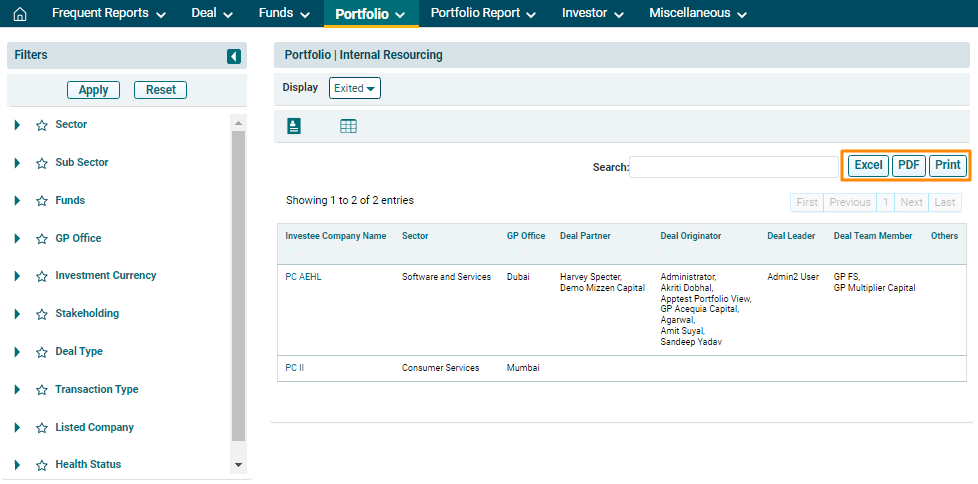
5. You can also
view the underlying dataset for the above data grid. Click on the Data Set icon. You can download the dataset in Excel and PDF
format. Click on the desired format to download.

6. To further drill down into the analysis, use the additional filters on the left-hand side. Select a filter and click on Apply. To reset the filters, click Reset.
