Capture Valuation
The Valuation panel allows you to capture the valuation details of the instruments. The details included are:
- Date of Valuation: Displays the date of valuation
- Valuation Method: Displays the method of valuation.
- Health Status: Displays whether the valuation is Above Plan, Below Plan or On Plan.
- Valuation Sheets: Displays the excel file containing valuation details. Click on the pin (
 ) icon in the corner of the field and choose the file.
 - Instrument-Wise Valuation: Displays the valuation details of the various instruments.
To modify valuation, follow the below steps:
1. Click on Add Valuation button in top right corner of the panel.

2. The Valuation Details window is displayed.
3. Update the details and click Save.
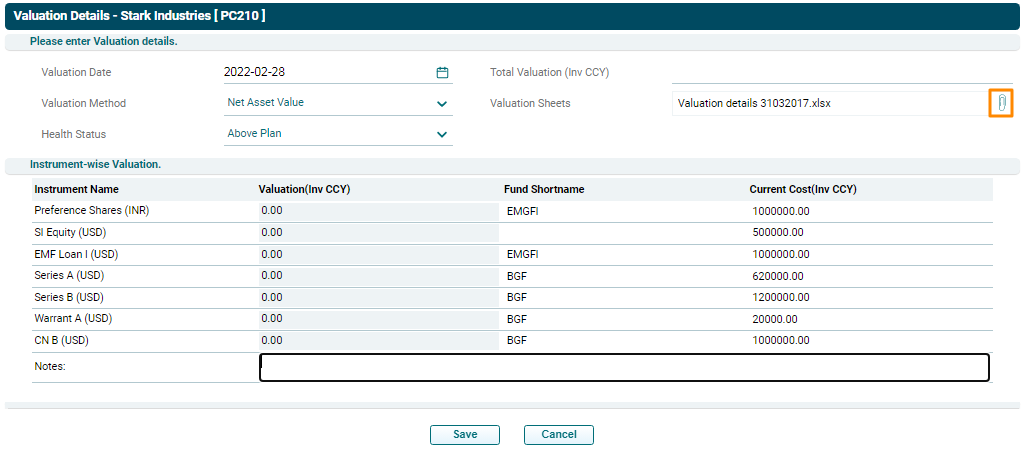
To edit valuation details, click on Edit ( ) icon in the Action column. The Valuation Details window is displayed. Update the details
and click Save.
) icon in the Action column. The Valuation Details window is displayed. Update the details
and click Save.
View Valuation Details
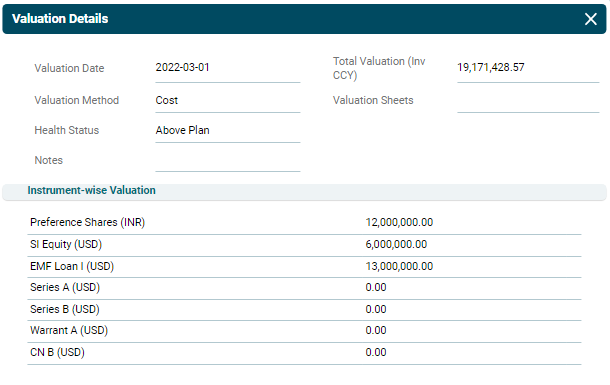
1. To view valuation details, click on the View ( ) icon in the
Action column. The valuation window is displayed.
) icon in the
Action column. The valuation window is displayed.
View History
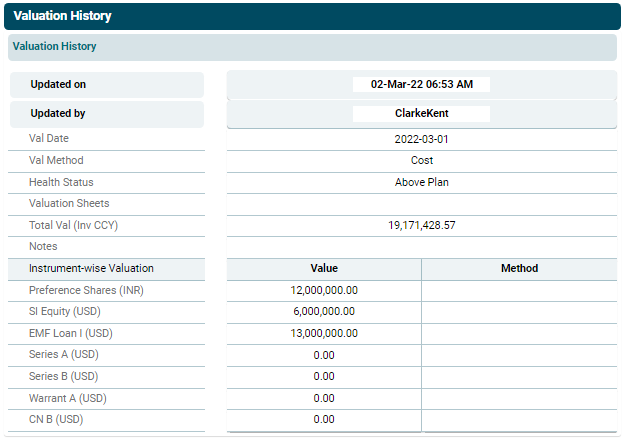
1. To view the changes made in the valuation, click on the View
History ( ) icon in the Action column. The Valuation History window is
displayed. You can view when were the changes made and by whom.
) icon in the Action column. The Valuation History window is
displayed. You can view when were the changes made and by whom.