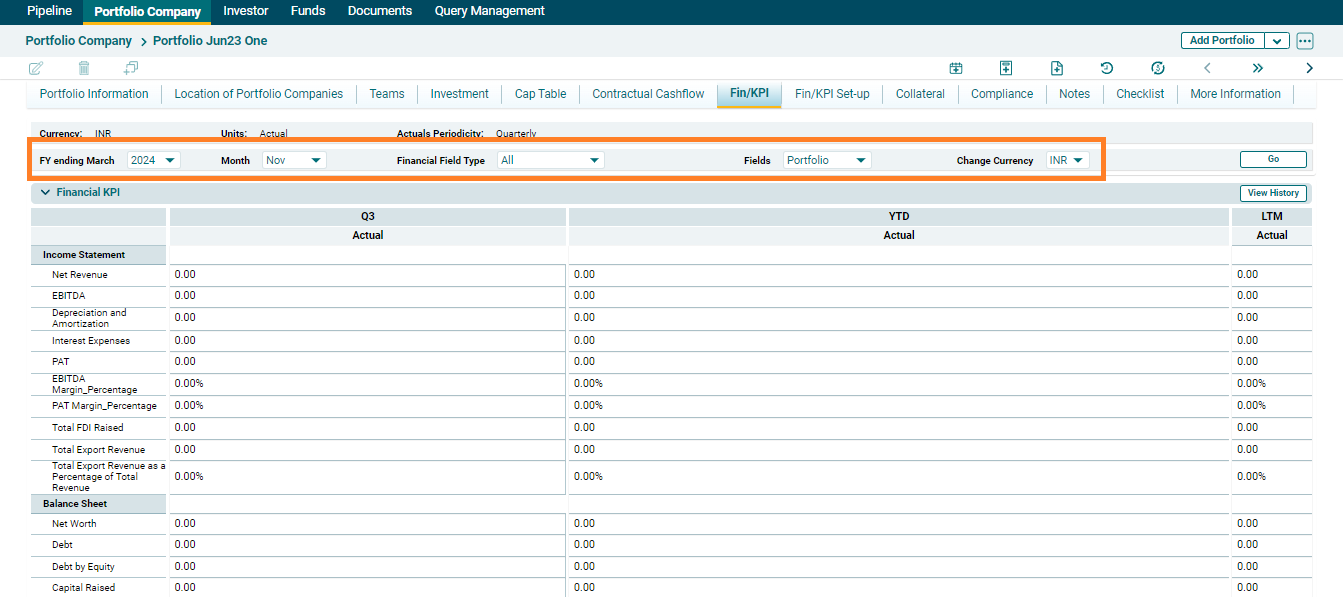
View Fin/KPIs
Financial KPI panel shows a multidimensional view of the Income Statement, Balance Sheet, Cashflow Statement, and KPI parameters for a monthly, quarter, YTD, and last twelve months for the selected financial year.
Users can view either All Fields or only Fund level fields by selecting from the Financial Field Type dropdown and the numbers in different currencies, you can select the desired currency from the dropdown list Change Currency dropdown.
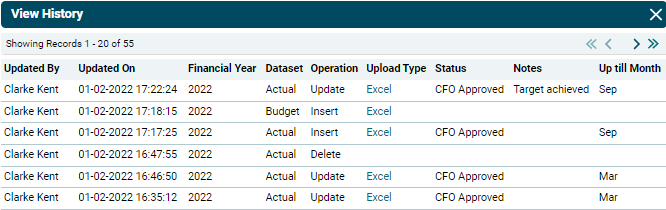
You can view the history of all the uploads of financial data by clicking on View History ( ) button in top right corner.
This will give you an audit trail of all the updates in financials along with the details like Name of the user who has done
the operation, Date and Time, Year, Dataset, Type of operation, Upload type, Status, Notes and Up till which month the data has been updated. You can also download excel of the previously uploaded versions of Financials/KPI.
) button in top right corner.
This will give you an audit trail of all the updates in financials along with the details like Name of the user who has done
the operation, Date and Time, Year, Dataset, Type of operation, Upload type, Status, Notes and Up till which month the data has been updated. You can also download excel of the previously uploaded versions of Financials/KPI.