Existing LP
Existing LP panel auto populates the details of only those investors who have given hard commitments as captured by AIF in Detailed Application Form (DAF).AIF cannot delete these investors, however, he can add new investors in this panel who were initially not added.
To add a new Investor, AIF has to firstly create Investor in the investor module. Click here to see how to create an Investor.
Each investor can be assigned a class of investors through which drawdown/distribution calculations can be appropriated. This panel is applicable to all fund types. The details included are:
- Investor Type: Here an AIF needs to select the investor type from the dropdown values.
- Investor Name: Here an AIF needs to search and select the name of the investor which needs to be mapped with the fund
- Type of Commitment: Here an AIF needs to select the type of commitment from the dropdown values.
- Commitment Date: Here an AIF has to select the commitment date of the investors
- Class of Investors: Here an AIF has to select the class of investors from the dropdown values
- Total Committed Investment: Here the total committed investment of the investor needs to be filled by an AIF
- % Committed: This is an auto calculated field.
- Drawdown Requested: Here an AIF needs to input the drawdown amount requested from the specific investor
- Close: Here the AIF can mention the close details.
- Contribution Amount: Here the contribution amount received from the specific investor can be filled
- Total Distribution: This field is non editable
- Notes: Here an AIF can enter notes regarding other details of the investors, if any, for reference purpose
After the investors are created AIF can map new investors in Existing LP panel by following the below steps:-
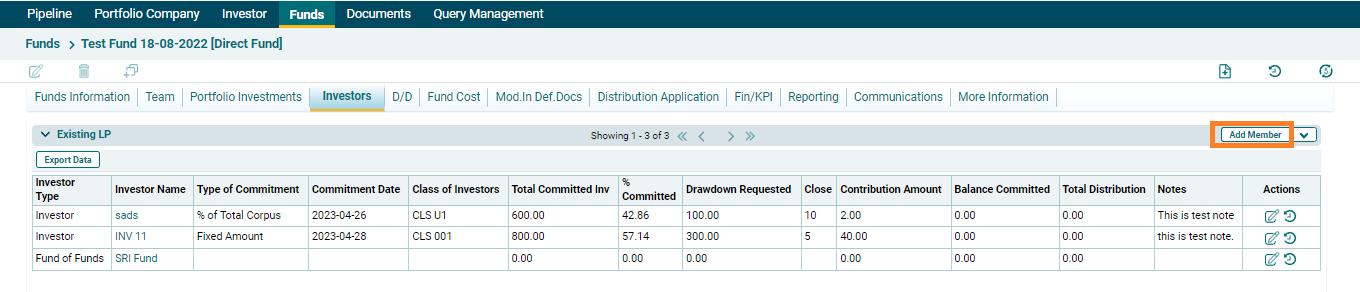
1. Click on Add Member button in the top right corner of the panel.
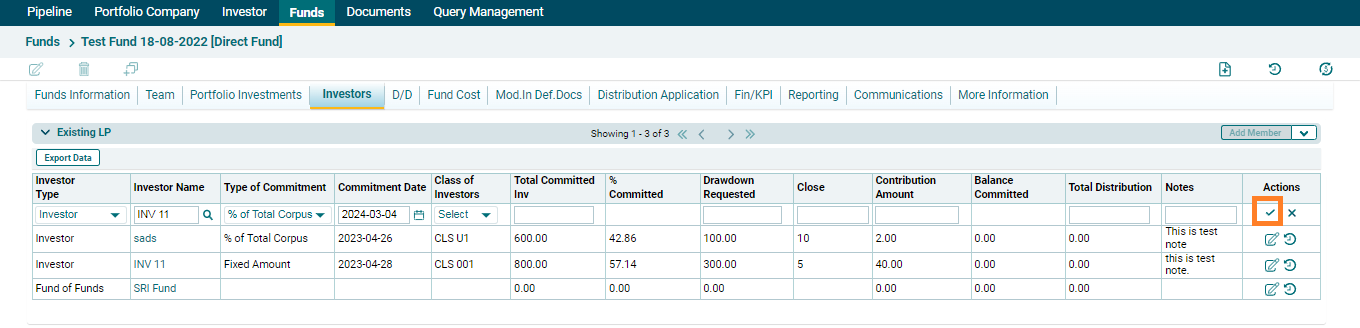
2. The fields will be activated. Search and select the specific investor/investors which needs to be mapped, fill the relevant fields and click on Check ( ) button, investor will be added in the existing LP panel.
4. To edit existing LP member details, click on the Edit icon ( ) in the Actions column. After making the changes, click on Check () button from Action column to save.
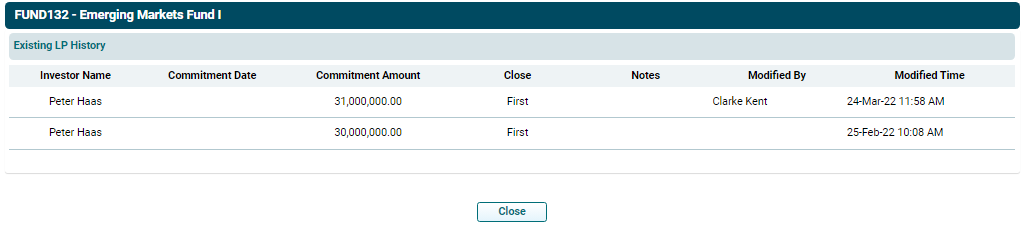
6. To view history of an investor, click on View History ( ) icon in the Actions Column. The Existing LP History window is displayed which shows when were the changes made and by whom along with the details of the investor.