
Modification in Definitive Documents
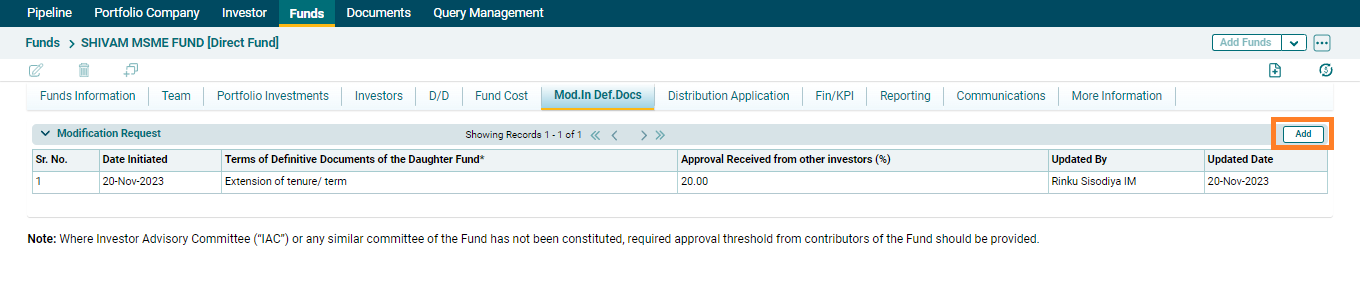
To generate modification in definitive document request, AIF user has to navigate to Mod.In.Def. Docs tab under Funds Module. As a next step, user has to click on add button in the modification request panel.
On clicking add button, add modification request pop up will open where the following details are included :-
⦁ Date initiated: - Auto populated as current date on which modification request is to be raised by an AIF user.
⦁ Terms of Definitive Documents of the Daughter Fund:- AIF user can select the terms of definitive document from the dropdown list.
⦁ Approval received from other investors(%):- In this column, AIF user need to enter the numeric value of the approval received from other investors for raising the modification in definitive documents request.
⦁ Existing terms:- It is a text field where user can enter the existing terms.
⦁ Proposed change in existing terms:- It is a text field where user can enter the proposed change in existing terms.
⦁ Attach Documents:- The user can attach documents in this column.

After filling up all the relevant fields, user can click on save or cancel button. On clicking save button, a modification request will be created and the following details will be visible to an AIF user
⦁ Date Initiated:- Date on which the request is created
⦁ Terms of Definitive Documents of the Daughter Fund:- The terms of definitive documents selected by the user while creating the request will be visible here.
⦁ Approval received from other investors(%):- Numeric value inputted by AIF user while creating the request will be visible here.
⦁ Updated By:- It will auto-populate the name of the SRI IM who updates the modification request.
⦁ Updated date:- It will auto populate the date on which modification request is updated by SRI IM.
