
Distribution Application
To generate a distribution application, AIF user has to navigate to distribution application panel. As a next step, user has to click on add button in the distribution application panel.

On clicking add button, distribution application pop up will open which consists of the following details :-

1. Distribution Details Panel:- This panel contains the following fields
a. Distribution Letter Date:- The user can select the distribution letter date from this field.
b. Payment Date:- Payment date can be selected from this field by the user.
c. Purpose: The user can select the purpose of raising distribution from the dropdown values.
d. Total Distribution Amount:- This is an auto-populated field that will fetch the net distribution amount from the transactions panel. ⦁ Transactions Section Panel :- This panel consists of two sections- Current Distribution and Cumulative Distribution. AIF user has to fill the values manually in current distribution section whereas all the values will get auto populated in Cumulative Distribution section once the distribution request is approved by SRI IM

2. Transactions Section Panel :- This panel consists of two sections- Current Distribution and Cumulative Distribution. AIF user has to fill the values manually in current distribution section whereas all the values will get auto populated in Cumulative Distribution section once the distribution request is approved by SRI IM
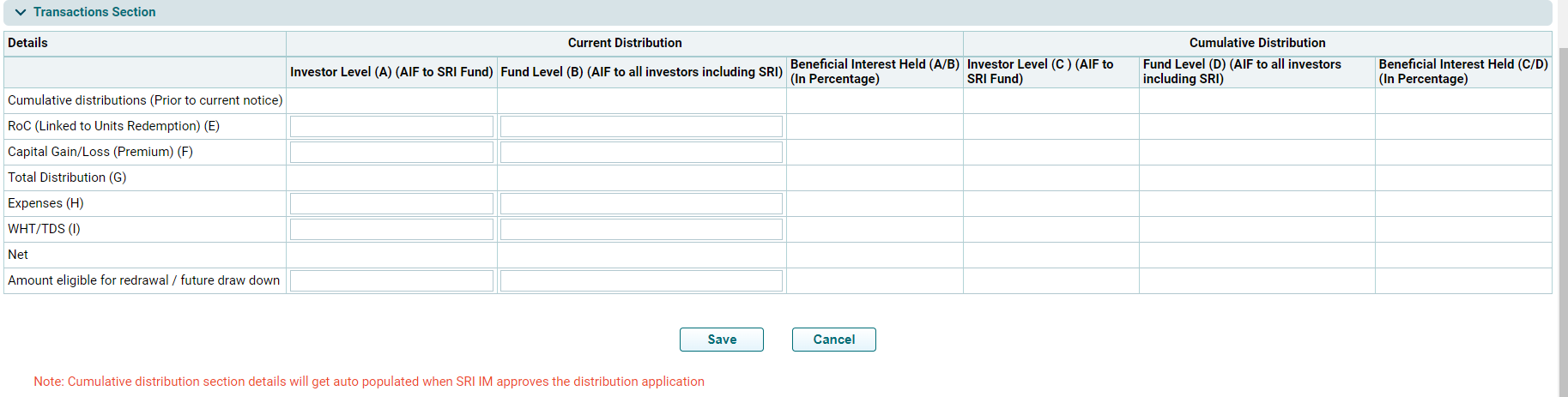
a. Cumulative distributions (Prior to current notice)- Auto generated and non editable numeric field.
b. ROC ( Linked to Units Redemption) (E) – Numeric field, manually editable by an AIF user.
c. Capital Gain/Loss (Premium) (F)- Numeric field, manually editable by an AIF user.
d. Total Distribution (G)- An auto populated field which shows summation of the values entered in (E) & (F)
e. Expenses (H)- Numeric field, manually editable by an AIF user.
f. WHS/TDS (I)- Numeric field, manually editable by an AIF user.
g. Net- This is an auto-populated field which shows the net value after deducting Expenses (H) & WHS/TDS (I) from the Total distributions (G)
h. Amount eligible for redrawal/future drawdown- Numeric field, manually editable by an AIF user.
1. 3. Other Section Panel :- This panel consists of two fields
a. Capital Gain- The user can select the value from the dropdown in this field
b. Number of Units Redeemed- Numeric field, manually editable by an AIF user.

4. Portfolio Details Panel:-This panel auto-populates the details of those portfolio companies that are marked Exit type- Full/Partial by an AIF in the Portfolio Company Module.

5. Document Section Panel:- The user can upload documents in this panel. The details get auto-populated once the documents are uploaded by an AIF.

Once all the panel details are filled and saved by an AIF, a distribution entry gets created in the system with status marked as ‘open’. AIF can review the application by clicking on edit option and modify the editable fields before submitting the application to SRI. In case no change is required, the user can proceed with submitting the application to SRI by clicking on submit icon.

Once the application is submitted by an AIF the status gets changed to submitted and the AIF cannot edit the application. The same can be done only if SRI reassigns the application back to AIF
