Funds Administration
Investment Drawdown Distribution Summary (Qtr)
This functionality is specifically for SRI
Investment Drawdown Distribution Summary (Qtr) panel allows you to view the complete overview of a
portfolio’s quarterly performance. This panel is available in the Performance tab and applicable to Master Fund, Fund SPV, Feeder Fund, and Fund of Funds.
You can view and download data related to drawdown and distribution from and to investors. You can specify the date range for which the drawdown distribution summary has to be viewed. The fields are auto-calculated and the data auto-populates from different tabs. The details included are:
- Date: Displays the date for which investor Drawdown and Distribution Summary will be available.
- Total Committed: Displays the total amount committed by the investors.
- Drawdown: Displays the amount of drawdown which has been called up from investors.
- Distribution: Displays the amount of Distribution that has been paid to investors.
- DPI: Displays the distribution to the paid-in percentage of the fund up to the specified date.
- TVPI: Displays the total value to the paid-in percentage of the fund up to the specified date.
- Fund Gross IRR: Displays the gross IRR of the fund up to the specified date.
- Fund Net IRR: Displays the net IRR of the fund up to the specified date.
- Units Issued: Displays the number of units issued to investors up to the specified date.
- Units Redeemed: Displays the number of units redeemed by investors up to the specified date.
To view drawdown distribution summary, follow the below steps:
1. Click on Add Date button in the top right corner of the panel.
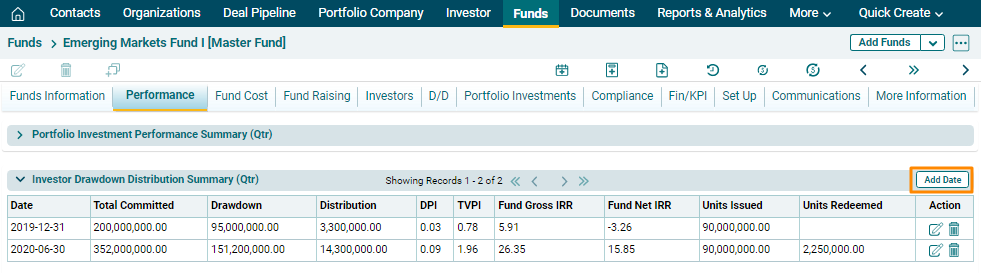
2. The field will be activated. Enter a date. Click on Check( ) button to save the details. Rest of the fields will be auto-calculated and auto-populated
from different tabs.
) button to save the details. Rest of the fields will be auto-calculated and auto-populated
from different tabs.
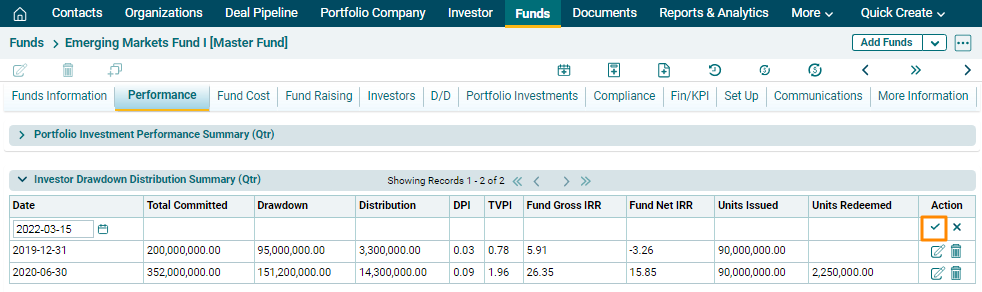
3. To edit investment drawdown distribution summary period,
click on the Edit icon ( ) in the Actions column. Change the date and click on
Check (
) in the Actions column. Change the date and click on
Check ( ) button to save.
4. To delete
investment drawdown distribution summary for a period, click on the Delete icon
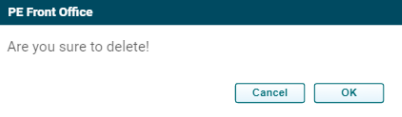
( ) in the Actions column. The delete window is displayed. Click OK to delete the fund raising details.