Configuration Editor
Configuration Editor gives
you the flexibility to configure maximum file upload size, default module, the
maximum text length that can be viewed in list view and maximum number of
records that can be viewed in list view of any module.
To modify Configuration
Editor, follow the below steps:
1. Click on CRM
Settings icon ( ) in the upper right corner.
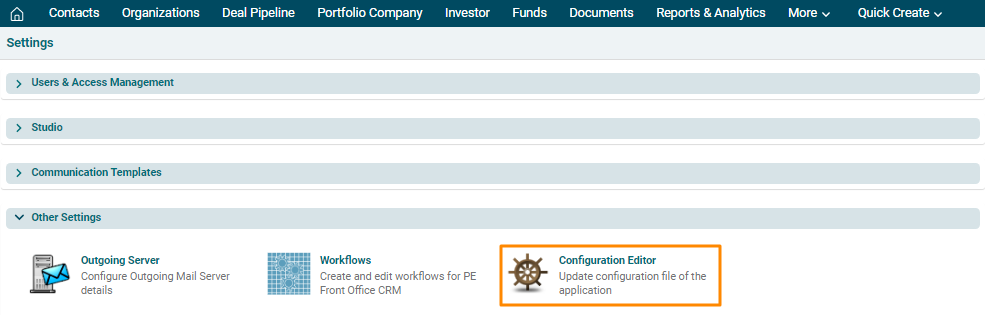
2. In the Other Settings panel, click on Configuration Editor.
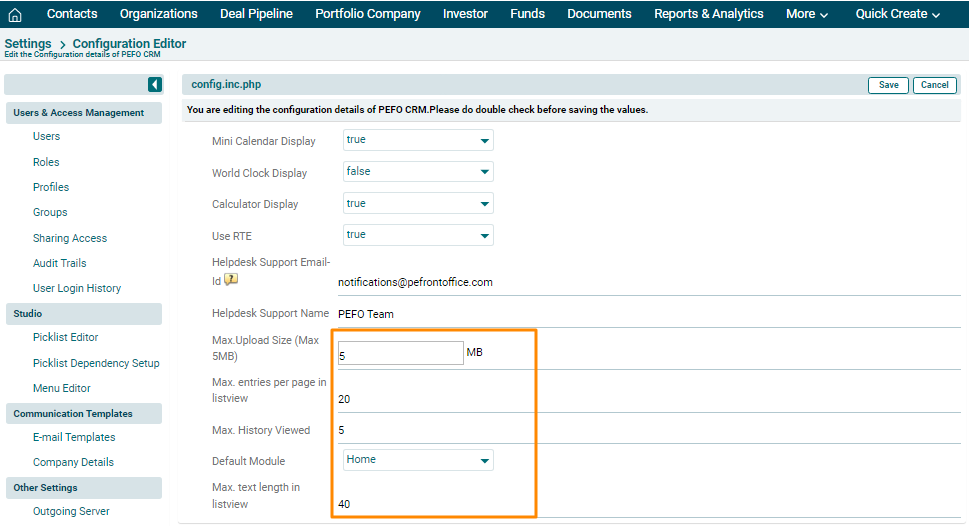
3. The config.inc.php window is displayed. The
details included are:
- Mini Calendar Display: Displays whether mini calendar is to be displayed or not.
- World Clock Display: Displays whether world clock is to be displayed or not.
- Calculator Display: Displays whether calculator is to be displayed or not.
- Use RTE: Displays whether RTE usage is enabled or not.
- Helpdesk support Email ID: Displays PEFO helpdesk support email ID.
- Helpdesk Support Name: Displays helpdesk support name.
- Max. Upload Size (Max 5 MB): Displays the max file size configured for uploading a document.
- Max. Entries per page in listview: Displays the number of entries allowed per page in listview.
- Max. History Viewed: Displays the maximum number of times, history can be viewed.
- Default Module: Displays the default module where you will land when you open PE Front Office.
- Max. Text length in
listview: Displays the length of
characters or integers of fields in the list view of any module.
4. Update the details and
click Save in the top right corner of the panel.