
Investor Management
Investment
Preferences Report
This functionality is specifically for SRI
To view
the Investment Preferences Report,
follow the below steps-
1. Click on Investor in the main menu.

2. Click on Investor Name for which report has to
be downloaded.
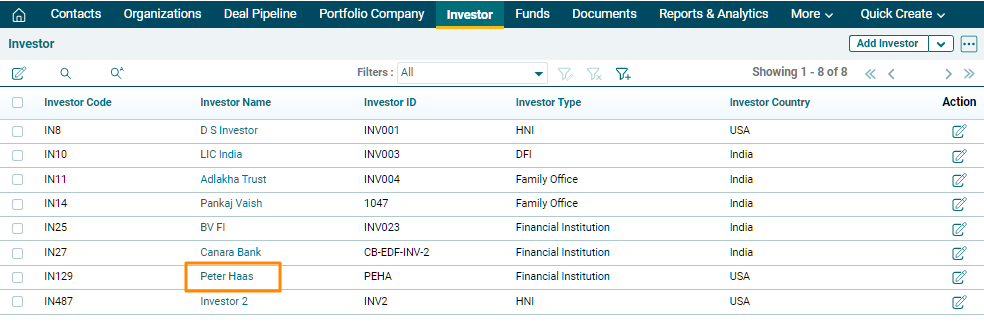
3. Click on
the three dot button in the top right corner. Click on Investment Preferences.
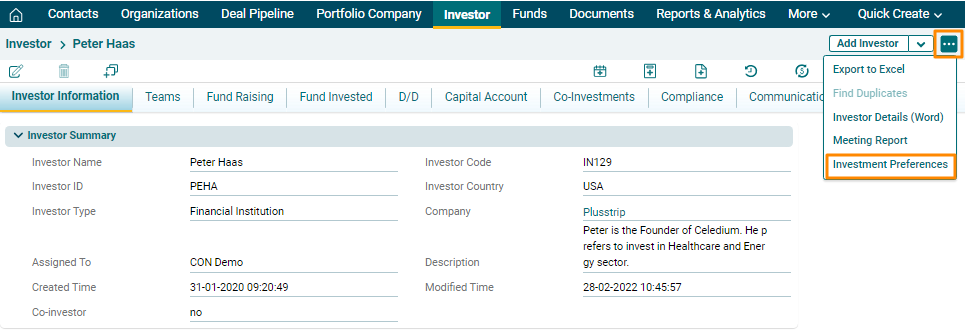
4. The Report
& Analytics window is displayed. In the Investment Preferences panel, apply
the following filters-
- Or/And- The toggle button to switch
between Or and And.
- Investment Preferences- To view the Investment Preferences
based on Sector, Sub-sector, Deal Type, Stakeholding, and Listed Company.
- Deal Stage- To filter results based on Deal
Stage.
- Group By- Group by Deal or Investor.
5. Click on Submit. The Excel file will download.

I
To view
the Investment Preferences Report,
follow the below steps-
1. Click on Investor in the main menu.
2. Click on Investor Name for which report has to
be downloaded.
3. Click on
the three dot button in the top right corner. Click on Investment Preferences.
4. The Report
& Analytics window is displayed. In the Investment Preferences panel, apply
the following filters-
- Or/And- The toggle button to switch
between Or and And.
- Investment Preferences- To view the Investment Preferences
based on Sector, Sub-sector, Deal Type, Stakeholding, and Listed Company.
- Deal Stage- To filter results based on Deal
Stage.
- Group By- Group by Deal or Investor.
5. Click on Submit. The Excel file will download.