
CRM
Creating A To-Do
Create a To-Do and assign
tasks to be completed to your internal team members by sending a reminder to
their mailboxes. To create a task, follow the below steps:
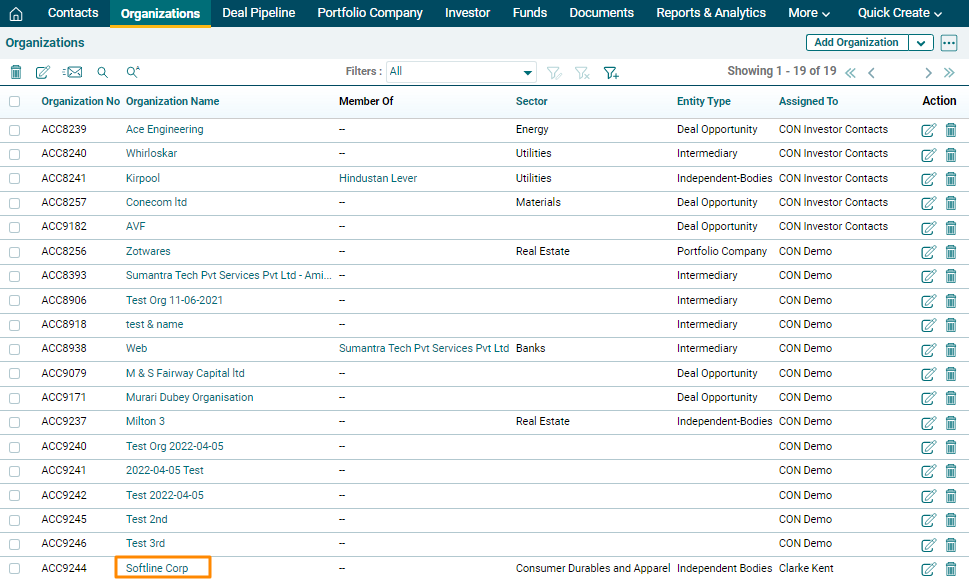
1. Click on the Organization for
which task has to be created.
2. Click on the Add To Do icon above the tabs.

3. The Calendar window
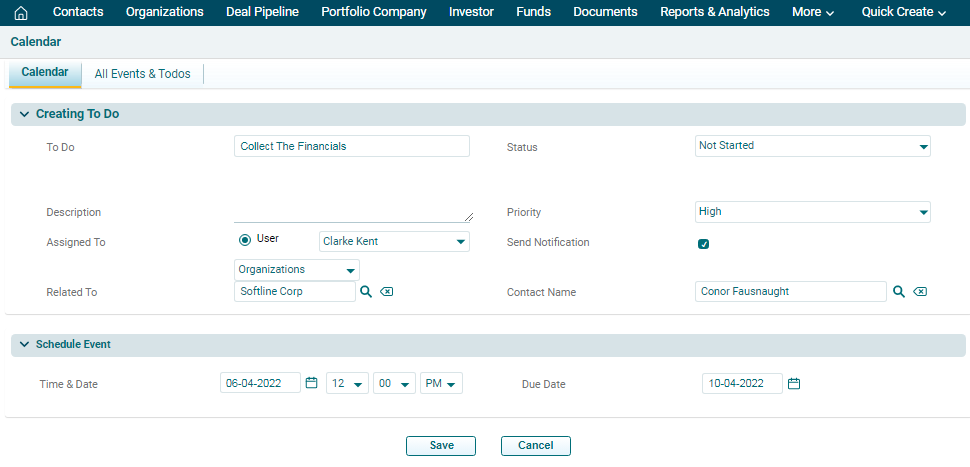
is displayed. In Creating To Do panel, you can add the details
for creating the task. The details included are:
- To Do: Input the task name
- Description: Specify the description of the task
- Assigned to: Task gets assigned to the user automatically
- Related To: Task gets related to the module automatically
- Status: Select the status of the task if it has started,
is in progress, completed, planned, etc
- Priority: Select the priority of the task if it is a high-priority,
low-priority or medium-priority task
- Send Notification: Check the box if you wish to send a notification
to the team.
- Contact: Search the contact from the Contacts Module with
whom the task has to be associated.
- Schedule Event: Choose Time & Date to send a notification and
specify a due date to complete the task
4. Click on Save.
5. The Event will be listed in the Activities Panel under the More Information Tab. Click on the Edit or Delete icons to make changes.
