
Instrument Summary
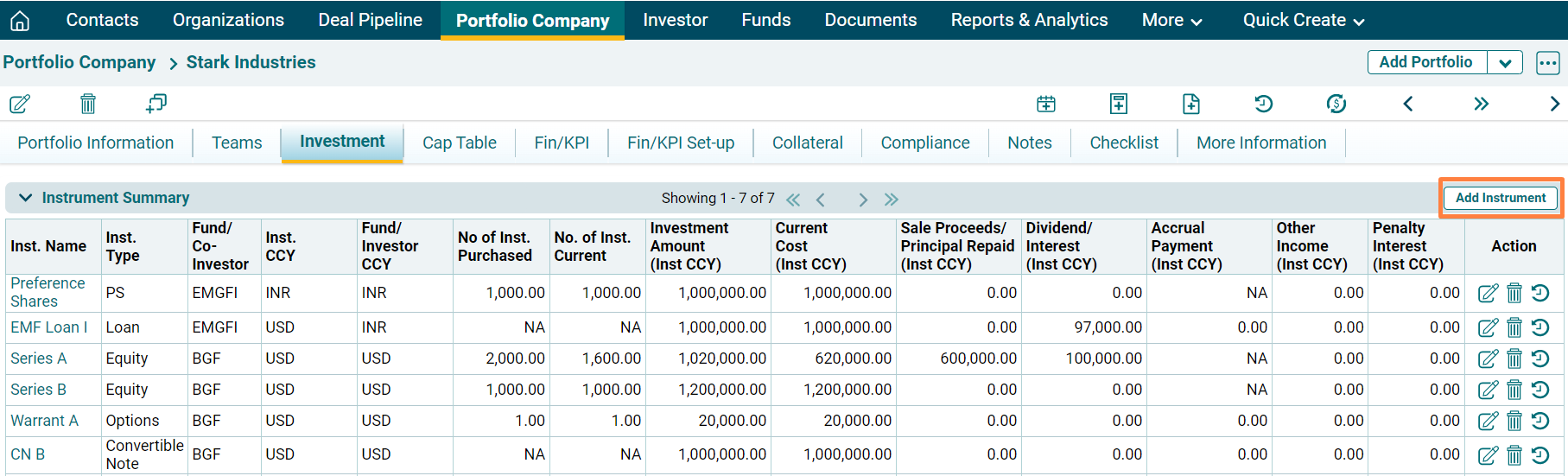
This panel allows you to view a detailed summary of various instruments in one place. The details included are:
- Inst. Name: Displays the name of the instrument through which investment is being made.
- Inst. Type: Displays the type of instrument whether equity, PS, loan, bond, convertible note and options.
- Fund/Co-Investor: Displays the name of the fund or the co-investor associated with the instrument.
- CCY: Displays the instrument currency.
- Fund/ Investor CCY: Displays the fund/ investor currency.
- No. Of Inst. Purchased: Displays the number of instruments purchased.
- No. of Inst. Current: Displays the number of instruments held currently.
- Investment Amount (Inst CCY): Displays the total investment amount in that instrument. The amount is displayed in instrument currency.
- Current Cost (Inst CCY): Displays the current cost of the investment. The amount is displayed in instrument currency.
- Sale Proceeds/ Principal Repaid (Inst CCY): Displays the sale proceeds from the sale of the instrument or principal repaid against loan, if any. The amount is displayed in instrument currency.
- Dividend/ Interest (Inst. CCY): Displays the dividend or interest received. The amount is displayed in instrument currency.
- Accrual Payment (Inst. CCY): Displays the accrued payment, if any. The amount is displayed in instrument currency.
- Other Income (Inst. CCY): Displays other income, if any. The amount is displayed in instrument currency.
- Penalty/ Interest (Inst. CCY): Displays penalty or interest levied if any. The amount is displayed in instrument currency..
Add Instrument
To add an instrument, follow the below steps:
1. Click on Add Instrument button in the top right corner of the Instrument Summary panel.
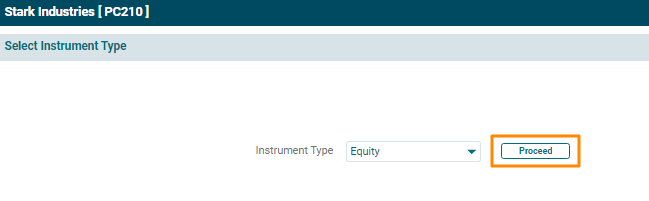
2. The Instrument Type window is displayed. Select instrument type from the Instrument Type dropdown list. Click Proceed.
3. The [Instrument] Details window is displayed. Enter the details and click Save.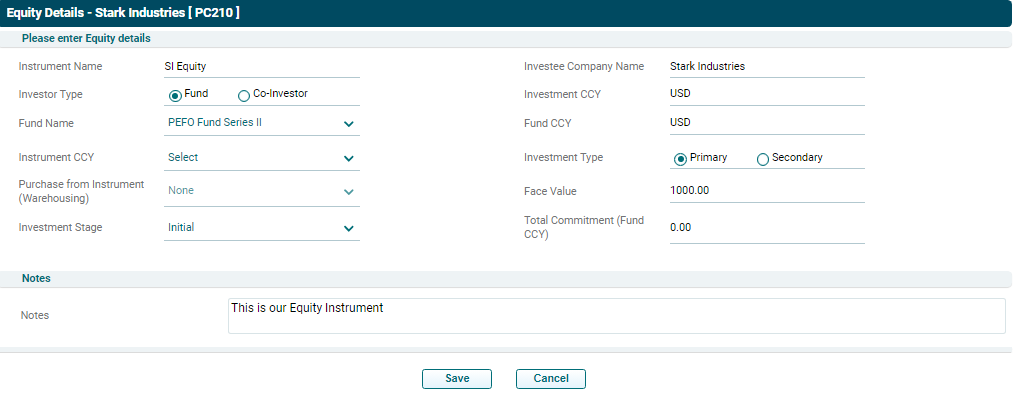
View Instrument
To view an instrument, click on the Instrument Name.

View History
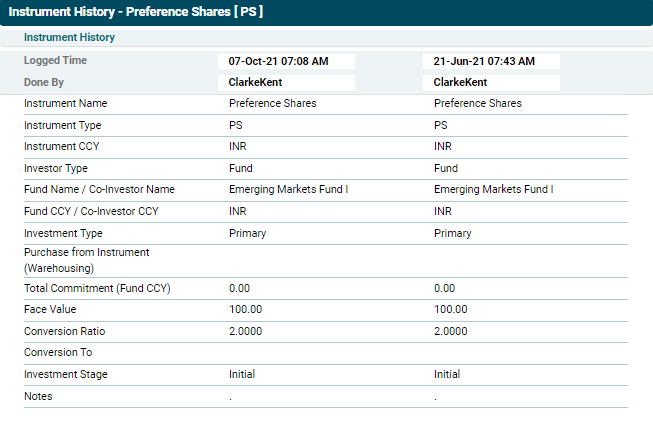
To view the recent changes made to an instrument, click on the View History icon( ) in the Actions column. The Instrument History window is displayed which shows when were the changes made and by whom along with details of the instrument.
Funds
This panel allows you to view a detailed summary of investments made by funds in the portfolio company. The panel gets auto-populated based on the underlying transactions. The details included are:
- Fund Name: Displays the name of the fund which has made an investment in the portfolio company.
- Fund Short Name: Displays the short name of the fund associated.
- Fund CCY: Displays the currency of the fund associated.
- Investment Amount: Displays the total investment amount in all instruments.
- Current Cost: Displays the current cost of the investment.
- Sale Proceeds/ Principal Repaid: Displays the sale proceeds from the sale of investments.
- Dividend/ Interest: Displays the dividend or interest received.
- Accrual Payment: Displays the accrued payment, if any.
- Other Income: Displays other income, if any.
- Penalty/ Interest: Displays penalty or interest levied if any.
- Total Realization: Displays the total realization value for the fund.
- Valuation Date: Displays valuation date, if any carried out in the past.
- Valuation: Displays the valuation of the fund, if any carried out in the past.
